App Not Installed: How to Fix It
Time Required: 3 to 5 Minutes | Platform: Android | Last Verified: August 2026
Written by David Kalin, Gaming & SEO Expert with 5+ years covering mobile games. This is an independent fan resource and is not affiliated with, endorsed by, or operated by AN Gaming Studio.
You tap install, wait for it to finish, and Android throws “App not installed” instead of opening the game. It is one of the more common complaints around Indian Vehicles Simulator 3D, and it almost always comes down to one of a handful of specific causes, not a broken download or a bad phone.
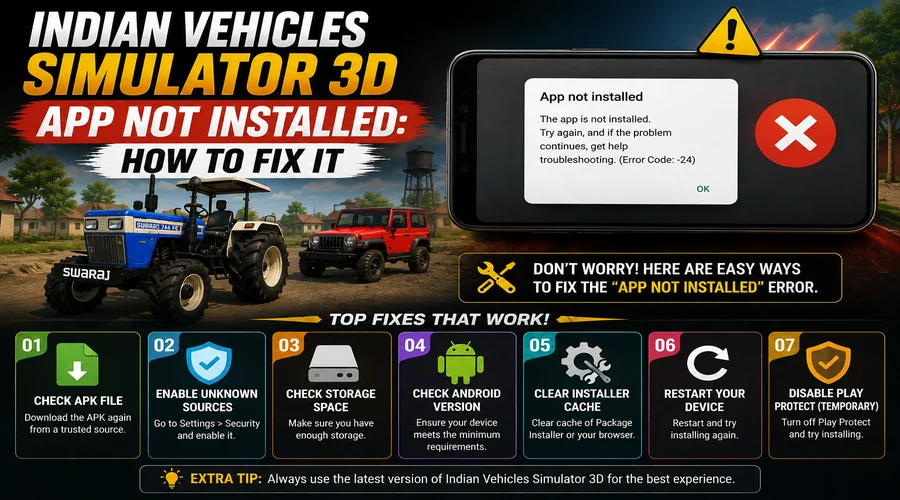
“App not installed” on Indian Vehicles Simulator 3D is most often caused by insufficient storage, an existing install with a different signature, a corrupted download, or an Android version below the 5.1 minimum, and each has a specific fix rather than a generic reinstall.
Why the App Not Installed Error Happens
This error is Android’s way of refusing an install it cannot safely complete, not a sign that the game itself is broken. The most common real cause is a signature conflict: if you already have a copy of the game installed from a different source, say the Play Store, then you try installing an APK from a different distributor, Android sees them as different apps trying to use the same identity and blocks the install rather than risk an overwrite.
The second most common cause is storage. The current version runs around 400 MB, and Android needs meaningfully more than that free to actually complete an install, not just the bare file size. A corrupted or incomplete download is the third common cause, particularly on a slow or unstable connection, the file looks complete in your Downloads folder but is actually missing data Android needs to verify before installing.
How to Fix the App Not Installed Error
Fix 1: Free Up Storage and Retry
Check your available storage under Settings, then Storage. Aim for at least double the game’s current download size free, roughly 800 MB to 1 GB of headroom for a 400 MB install, since Android needs working space beyond just the final installed size. Clear out unused apps, old downloads, or large photos and videos if you’re short, then retry the install.
Fix 2: Uninstall Any Existing Copy First
If you’ve ever installed this game from a different source, the Play Store, a direct APK, or a different aggregator site, uninstall it completely before installing again from a new source. Go to Settings, then Apps, find Indian Vehicles Simulator 3D, and uninstall it, even if it looks like it’s not currently on your device, a partial or corrupted leftover install can still block a new one. Once removed, redownload fresh and try again.
Fix 3: Redownload and Verify the File
If storage and signature conflicts aren’t the issue, the download itself may be corrupted or incomplete. Delete the file from your Downloads folder, confirm you have a stable connection, and download it again from scratch rather than resuming a partial download. If you’re installing an APK or XAPK directly rather than through the Play Store, double check the file size roughly matches what the source lists, currently around 401 MB for the XAPK build, a significantly smaller file than that is a strong sign of a bad download.
If none of these three fixes resolve it, confirm your Android version meets the minimum requirement of Android 5.1. Devices below that simply cannot install the current build regardless of storage or file integrity, and in that case, an older version of the game from our Old Version download page may be your only real option.
How to Prevent the App Not Installed Error Going Forward
Stick to one consistent source for this game going forward, ideally the official Play Store, to avoid the signature-conflict problem entirely. The Play Store install flow shows a clear “Verified by Play Protect” confirmation before installation even begins, which is both a safety signal and confirmation the file is legitimate. Keep a reasonable buffer of free storage on your device generally, not just when you’re about to install something, and if you do download an APK or XAPK manually, verify the file size against the official listing before installing rather than after something goes wrong.
App Not Installed: Frequently Asked Questions
Q: Why does Indian Vehicles Simulator 3D say “app not installed”?
Most often it’s a signature conflict with an existing install from a different source, insufficient free storage, a corrupted download, or an Android version below the 5.1 minimum.
Q: How much storage do I actually need to install it?
The current download is roughly 400 MB, but aim for 800 MB to 1 GB free to give Android enough working space to complete the install, not just the file size itself.
Q: I uninstalled and reinstalled and it still won’t install, what now?
Redownload the file completely rather than reusing the old download, since a corrupted file will fail again even after uninstalling, and confirm your Android version meets the 5.1 minimum.
Q: Does this happen more with APK downloads than the Play Store?
Installing through the Play Store handles compatibility and file integrity automatically, so signature conflicts and corrupted downloads are less common there than with manually downloaded APK or XAPK files.
Q: My phone meets the requirements but it still won’t install, what else could it be?
Check for a partial or leftover install from a previous attempt under Settings, then Apps, even one that doesn’t show up as fully installed can still block a new install attempt.
Final Tips to Avoid App Not Installed Errors
Work through the fixes in order, storage first, then signature conflicts, then a fresh download, since that covers the causes in order of how often they actually happen. If you’re still stuck after all three, an older, smaller version from our Old Version download page is worth trying, particularly on an older or storage-limited device. For general install steps rather than troubleshooting, our homepage covers the full download and install process from scratch. And if the game installs fine but then won’t open, crashes, or freezes, that’s covered separately in our Indian Vehicles Simulator 3D not working guide. If you downloaded a file manually rather than through the Play Store, also double-check you grabbed the right file type, our APK vs XAPK guide explains the difference.